MSI · MODEL REFERENCE

MAG B550 TOMAHAWK

The right downloads. A clearer view of your board.

AM4AMD B550DDR4Interactive connector map

What do you need?

All downloads open on MSI’s website. Select the matching category if the site opens its default tab. MoboDocs does not host installers or BIOS files.

Match the complete model name and PCB revision before downloading. DDR4/DDR5, Wi-Fi, MAX and II variants can use different files.
KNOW YOUR BOARD

Explore the board, from above.

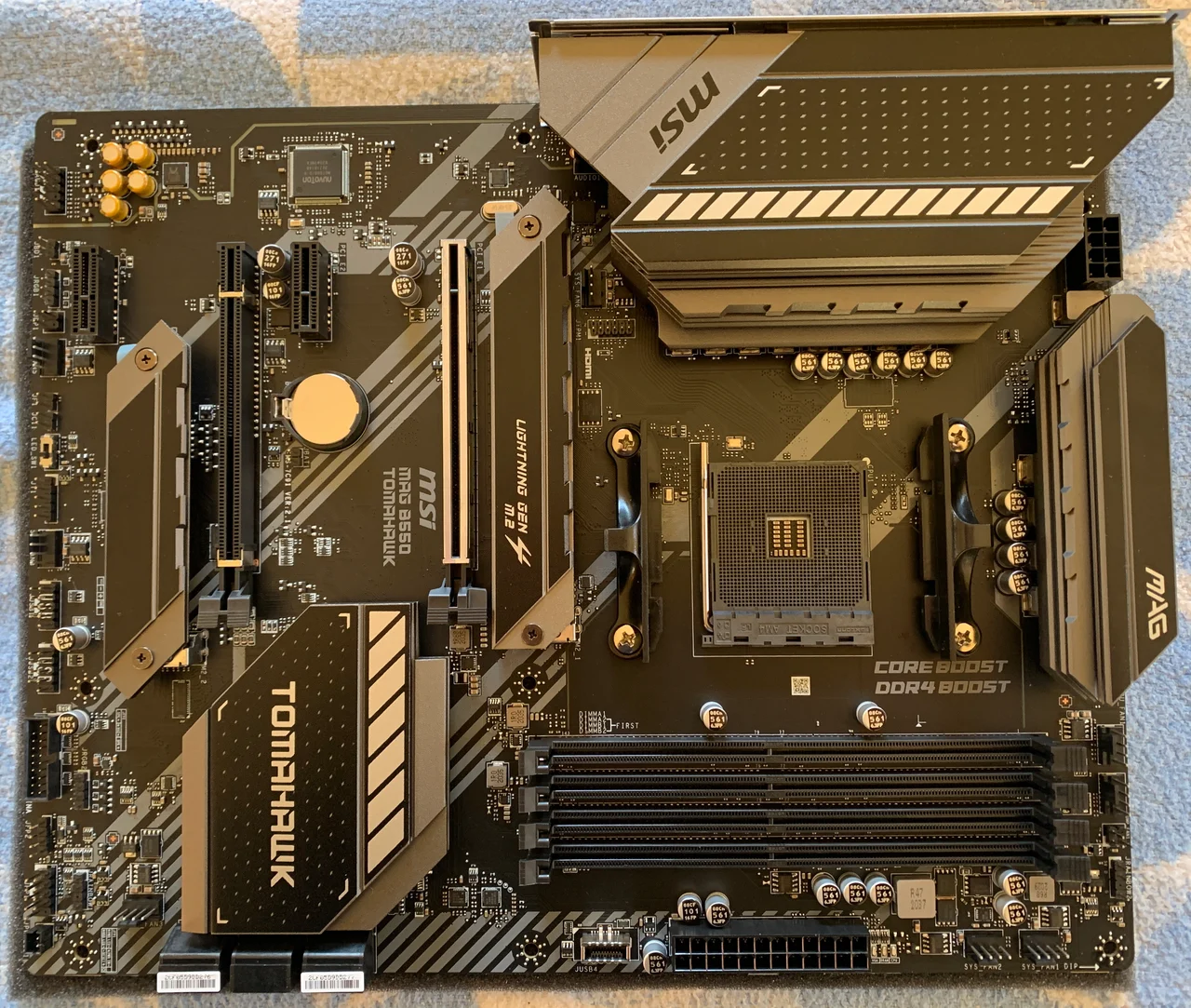
Select a number or a connector name. Photograph orientation: rear I/O at the top, memory slots along the bottom.

MSI MAG B550 TOMAHAWK photographed from above; rear I/O is along the upper edge.
Photo: Michael Wolf, Penig · Original · CC BY-SA 3.0. Resized and converted to WebP. Numbered annotations by MoboDocs; annotated view shared under CC BY-SA 3.0.

AM4 CPU socket

The processor socket. Check the exact CPU in the manufacturer support list.

Check manufacturer details ↗

DDR4 memory slots

Four DIMM slots; slot labels are printed beside the sockets.

Check manufacturer details ↗

24-pin ATX power

Main motherboard power connector below the memory slots in this photo.

Check manufacturer details ↗

8-pin CPU power

CPU power connector next to the upper VRM heatsink.

Check manufacturer details ↗

Primary PCIe slot

Reinforced PCI_E1 expansion slot, connected to the CPU.

Check manufacturer details ↗

Upper M.2 position

M2_1 is beneath the upper M.2 heatsink beside the CPU socket.

Check manufacturer details ↗

Manufacturer specifications and connector list ↗

Specifications & model notes

Form factor
ATX
Memory slots
4
M.2 storage slots
2
SATA ports
6

Physical connector counts do not guarantee simultaneous use. Check processor and lane-sharing limits in the specification.

Two wired network ports: 2.5GbE and 1GbE. M2_1 accepts PCIe or SATA storage; M2_2 accepts PCIe storage. With M2_2, PCI_E2 and PCI_E3 occupied together, PCI_E3 is unavailable and M2_2 runs at x2. CPU choice also affects PCIe support.

Original documentation

Manufacturer support & documentationChoose the matching manual, revision and language.
Open source ↗
Specifications & compatibilityCheck CPU support, memory and expansion limits.
View details ↗
Official product photosView the manufacturer’s gallery and compare the exact model.
View product ↗

Helpful starting points

Each guide states its scope. General checklists are not hardware tests of this particular model.

↗
Storage & expansion · 4 min read

Will an M.2 SSD disable another port?

Read slot-sharing notes before adding an SSD or expansion card.

↗
Connectors & assembly · 4 min read

Connect your case’s front-panel cables

Identify the power switch, reset switch, and indicator LEDs using the correct header map.

↗
Identify your board · 3 min read

How to find your motherboard model and revision

Read the board identity in Windows, then distinguish the product name, hardware revision and BIOS version.

↗
Drivers & setup · 3 min read

Where to download motherboard drivers

Find chipset, network and audio drivers for the exact board and operating system, including a plan for a PC without internet.

↗
CPU & BIOS · 3 min read

Will this CPU work? Check the board and BIOS together

A matching socket is only the first check. Read the exact CPU support entry and required BIOS before replacing a processor.

Sources reviewed 2026-10-22 · Report a correction.